When Google Ads “burns your budget,” it usually means your advertising funds are being consumed by low-quality clicks, wrong audiences, or inefficient system defaults without producing actual revenue or leads.
Google’s platform is built to maximize ad reach and usage. If you do not actively set strict boundaries, default settings will allocate your money toward easy-to-get clicks rather than high-intent buyers.
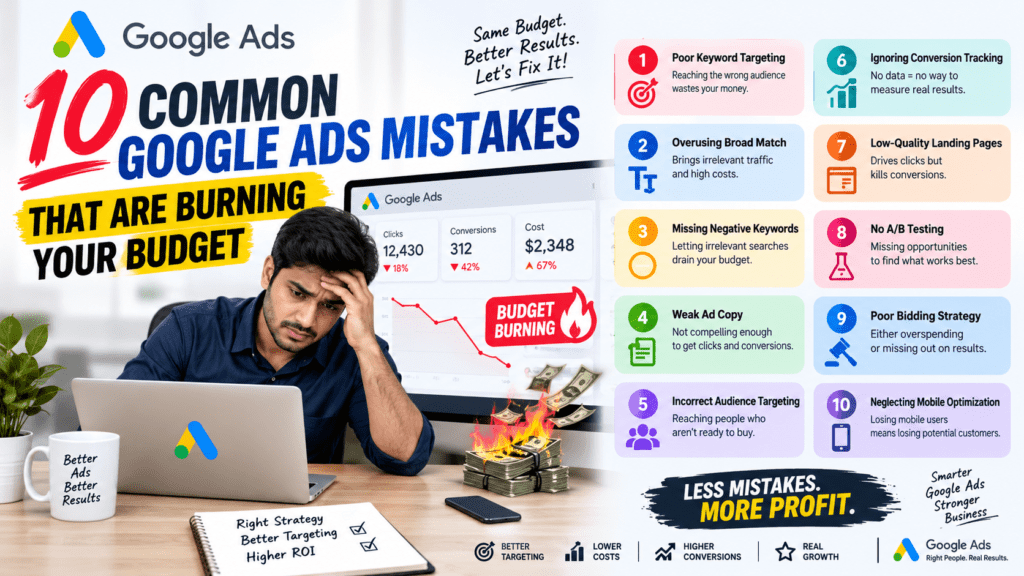
Running Google Ads without tight structural controls can quietly drain your marketing budget while delivering minimal return on investment. Because Google Ads defaults to settings that encourage broad spending, unmonitored accounts can lose 30% to 50% of their ad spend on non-converting traffic.
1. Using Unrefined Broad Match Keywords Without Guardrails
The Problem: Broad match allows Google to show your ad for any search query it considers “related,” including synonyms, misspellings, and loose variations. Without high conversion volume or tight audience signals, broad match triggers ads for low-intent searches.
The Fix: Start new campaigns with Phrase Match and Exact Match keywords. Only test Broad Match when paired with proven automated bidding (Target CPA / Target ROAS) and extensive negative keyword lists.
2. Neglecting Negative Keyword Lists
The Problem: If you don’t explicitly tell Google what search terms to exclude, you’ll end up paying for clicks containing terms like “free,” “jobs,” “template,” “DIY,” “meaning,” or irrelevant services you don’t offer.
The Fix: Conduct a weekly audit of your Search Terms Report. Build shared account-level and campaign-level negative keyword lists to prevent wasted spend across all ad groups.
3. Inaccurate or Broken Conversion Tracking
The Problem: Automated bidding algorithms rely on accurate data. If your tracking counts generic page views as conversions, or if phone call tracking breaks, Google optimizes campaign delivery toward low-value or fake leads.
The Fix: Verify your primary conversion actions in Google Ads and GA4 monthly. Focus optimization on true bottom-of-funnel actions (e.g., qualified lead submissions, completed purchases, calls over 60 seconds).
4. Directing Ad Traffic to Generic Homepages
The Problem: A homepage contains multiple navigation options and general messaging. Sending targeted search traffic to a homepage creates friction, raises bounce rates, lowers Quality Score, and increases your Cost Per Click (CPC).
The Fix: Direct ad clicks to dedicated, campaign-specific landing pages with clear, single-focus calls-to-action (CTAs) that match the exact promise made in the ad copy.
5. Combining Search and Display Networks in One Campaign
The Problem: Search campaigns target users actively searching for solutions (high intent), while Display campaigns target passive browsers (low intent). Leaving “Display Expansion” enabled on Search campaigns dilutes click-through rates (CTR) and spends budget on ineffective banner placements.
The Fix: Always uncheck “Include Google Display Network” in Search campaign settings. Keep Search and Display in dedicated, separate campaigns.
6. Using Default Location Settings ("Presence or Interest")
The Problem: Google’s default location setting targets “People in, or who show interest in, your targeted locations.” This means someone residing in another country or state searching about your region can trigger your ad, wasting spend on non-serviceable traffic.
The Fix: Go to Campaign Settings > Location Options, and switch the target setting to “Presence: People in or regularly in your targeted locations.”
7. Blending Brand and Non-Brand Campaigns
The Problem: Branded search terms (users searching for your company name) yield high conversion rates and low CPCs. Combining brand and non-brand keywords in one campaign artificially inflates overall ROI metrics, hiding underperformance in prospect acquisition keywords.
The Fix: Separate Branded campaigns from Non-Branded campaigns to maintain clear visibility into true Customer Acquisition Cost (CAC) and control budget distribution.
8. Switching to Automated Bidding Too Early
The Problem: Smart Bidding strategies (e.g., Target CPA, Target ROAS) require consistent conversion data to calibrate accurately (typically 30+ conversions per month per campaign). Applying smart bidding on low-data accounts leads to erratic bidding and high CPLs.
The Fix: Start new campaigns on Manual CPC or Enhanced CPC to establish baseline traffic and conversion data before transitioning to automated Smart Bidding.
9. Uploading Weak Responsive Search Ads (RSAs)
The Problem: Adding few headline variations or repeating similar phrasing limits Google’s algorithm from serving dynamic, highly tailored ad combinations, resulting in poor Ad Strength ratings and lower Quality Scores.
The Fix: Fill out all available headline and description slots in RSAs. Feature distinct value propositions, dynamic keyword insertion, social proof, and compelling CTAs to achieve “Good” or “Excellent” Ad Strength.
10. Operating on a "Set-and-Forget" Mindset
The Problem: Search behavior, competitor bids, and auction dynamics change constantly. Accounts left without active management experience decay over time, leading to lower CTRs and higher acquisition costs.
The Fix: Set a routine optimization schedule:
Weekly: Audit search terms, add negative keywords, monitor bids.
Monthly: Review ad copy performance, placement exclusions, landing page conversion rates, and budget pacing.
Quick-Start Audit Checklist
To plug immediate budget leaks today:
Change Location Settings to “Presence” only.
Disable Display Expansion on all Search campaigns.
Filter Search Terms for the last 30 days and add irrelevant terms to your Negative Keyword List.
Fire a Test Conversion to ensure tracking accuracy.