Running advertisements on Google can feel overwhelming when you’re just getting started. With so many campaign types, bidding options, targeting settings, and keyword strategies, it’s easy to spend money without seeing any real results.
The good news is that you don’t need a massive budget to run a successful campaign. Even with a modest investment, you can attract qualified leads, increase website traffic, and generate sales—provided you set up your campaign correctly from the beginning.
In this guide, you’ll learn exactly how to launch your first Google Ads campaign while avoiding the mistakes that cost beginners both time and money.
Google Ads is Google’s online advertising platform that allows businesses to display advertisements on Google Search, YouTube, Gmail, Google Maps, and millions of partner websites.
Whenever someone searches for a product or service, Google shows the most relevant advertisements based on factors such as:
- Keywords
- Ad quality
- Competition
- Budget
- Landing page experience
Unlike traditional advertising, Google Ads allows you to pay only when someone clicks on your advertisement. This model is known as Pay-Per-Click (PPC) advertising.
Why Should Beginners Start Using Google Ads?
Google Ads provides several advantages, especially for small businesses and startups.
Immediate visibility
Unlike SEO, which can take months to produce results, Google Ads can start generating traffic almost immediately.
Better targeting
You can reach users based on:
- Location
- Age
- Device type
- Search intent
- Interests
Budget control
You have complete control over how much you spend each day.
Measurable results
Every click, conversion, and interaction can be tracked.
Step 1: Define Your Goal Before Spending Money
Many businesses fail because they launch campaigns without defining a clear objective.
Ask yourself the following questions:
- Do you want more website traffic?
- Are you trying to generate leads?
- Do you want more phone calls?
- Are you selling products online?
Your campaign structure should always align with your primary goal.
For example:
| Goal | Recommended Campaign |
|---|---|
| Website traffic | Search campaign |
| Lead generation | Search campaign |
| Brand awareness | Display campaign |
| Product sales | Shopping campaign |
| Video views | YouTube campaign |
Step 2: Choose the Right Campaign Type
Google offers several campaign formats, but beginners should focus on Search campaigns first.
Search Campaigns
Your advertisements appear when users search for specific keywords.
Example:
If someone searches for:
- “best digital marketing agency”
- “SEO expert near me”
Your advertisement may appear at the top of the search results.
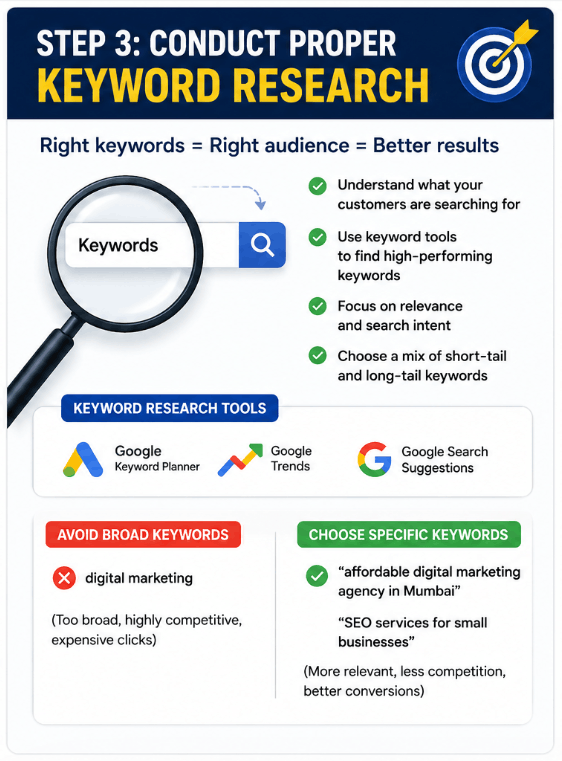
Step 3: Conduct Proper Keyword Research
Keywords determine when your advertisements appear.
Instead of targeting broad terms such as:
Digital marketing
Try more specific keywords like:
Affordable digital marketing agency in Mumbai
SEO services for small businesses
Free keyword research tools
- Google Keyword Planner
- Google Trends
- Google Search suggestions
Step 4: Understand Keyword Match Types
Selecting the right keyword match type can save a significant amount of money.
| Match Type | Example | Usage |
|---|---|---|
| Broad match | digital marketing services | Maximum reach |
| Phrase match | “digital marketing services” | Better control |
| Exact match | [digital marketing services] | Highly targeted |
Phrase and exact match keywords are usually better options for beginners.
Step 5: Create a Realistic Budget
One of the biggest mistakes new advertisers make is investing too much money too quickly.
Start with a smaller budget and increase it gradually as you collect data.
A beginner-friendly budget might look like this:
| Expense | Daily Budget |
|---|---|
| Search campaign | ₹500 |
| Display campaign | ₹300 |
| Remarketing campaign | ₹200 |
This approach helps you understand what is working before scaling your spending.
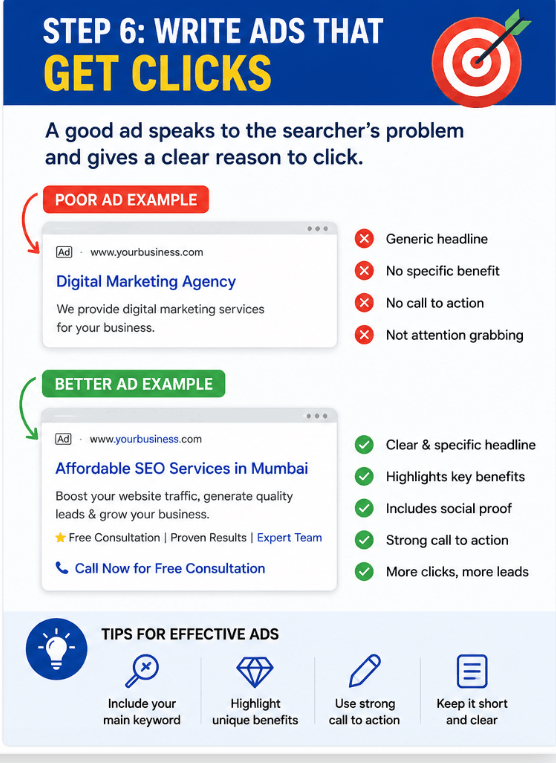
Step 6: Write Advertisements That Encourage Clicks
Your advertisement should address the user’s problem and present a clear solution.
Poor advertisement example
Headline: Digital Marketing Agency
Description: We provide marketing services.
Better advertisement example
Headline: Affordable SEO Services in Mumbai
Description: Increase traffic, generate leads, and grow your business. Get a free consultation today.
Tips for writing effective advertisements
- Include your main keyword.
- Highlight benefits instead of features.
- Add numbers whenever possible.
- Use a strong call to action.
- Keep your message concise.
Step 7: Optimize Your Landing Page
Even the best advertisement won’t produce results if users land on a slow or confusing page.
Your landing page should include:
- A compelling headline
- Fast loading speed
- Mobile responsiveness
- Customer reviews
- Clear contact information
- Simple forms
Remember that Google rewards high-quality landing pages with better ad placements and lower costs.
Step 8: Add Negative Keywords
Negative keywords prevent your advertisements from appearing for irrelevant searches.
Suppose you sell premium services.
You may want to exclude terms such as:
- Free
- Cheap
- Internship
- Job
- Tutorial
This small adjustment can significantly reduce unnecessary spending.
Step 9: Set Up Conversion Tracking
Many beginners focus only on clicks.
Successful advertisers focus on conversions.
Track important actions, including:
- Phone calls
- Form submissions
- Purchases
- Newsletter subscriptions
Without proper tracking, you won’t know whether your campaign is profitable.
Common Google Ads Mistakes Beginners Should Avoid
Ignoring keyword research
Choosing the wrong keywords can waste your budget very quickly.
Using broad targeting
Targeting everyone usually results in poor performance.
Sending traffic to the homepage
A dedicated landing page often performs much better.
Not testing advertisements
Create multiple variations and compare the results.
Increasing budgets too quickly
Allow your campaign enough time to gather data before making major changes.
A Simple Beginner Strategy
If you’re starting from scratch, follow this plan:
- Create a Search campaign.
- Choose five to ten targeted keywords.
- Set a daily budget.
- Write two versions of the advertisement.
- Add negative keywords.
- Track conversions.
- Review results weekly.
Consistency matters much more than spending a large amount of money.
Final Thoughts
Google Ads can become one of the most effective marketing channels for businesses of any size. However, success doesn’t come from spending more money; it comes from spending money intelligently.
Start small, test continuously, analyse your data, and improve your campaigns over time. By following the strategies outlined in this guide, you’ll be able to launch your first Google Ads campaign confidently while avoiding the costly mistakes that many beginners make.
If you treat Google Ads as an ongoing process rather than a one-time setup, you’ll have a much greater chance of achieving long-term success.
