Introduction: The Content Creation Treadmill
Let’s face it: creating a high-ranking, deeply researched, value-packed blog post takes hours—sometimes days—of brainstorming, outlining, writing, and editing. Then, you hit “Publish,” share it once on social media, and watch as the traffic eventually plateaus.
If you are constantly scrambling to feed the endless content beast across LinkedIn, X, Instagram, YouTube, and email, you are suffering from a syndrome every modern marketer knows too well: the single-use content trap.
The secret of top-tier creators and high-growth brands isn’t that they write more content from scratch. It is that they repurpose smarter.
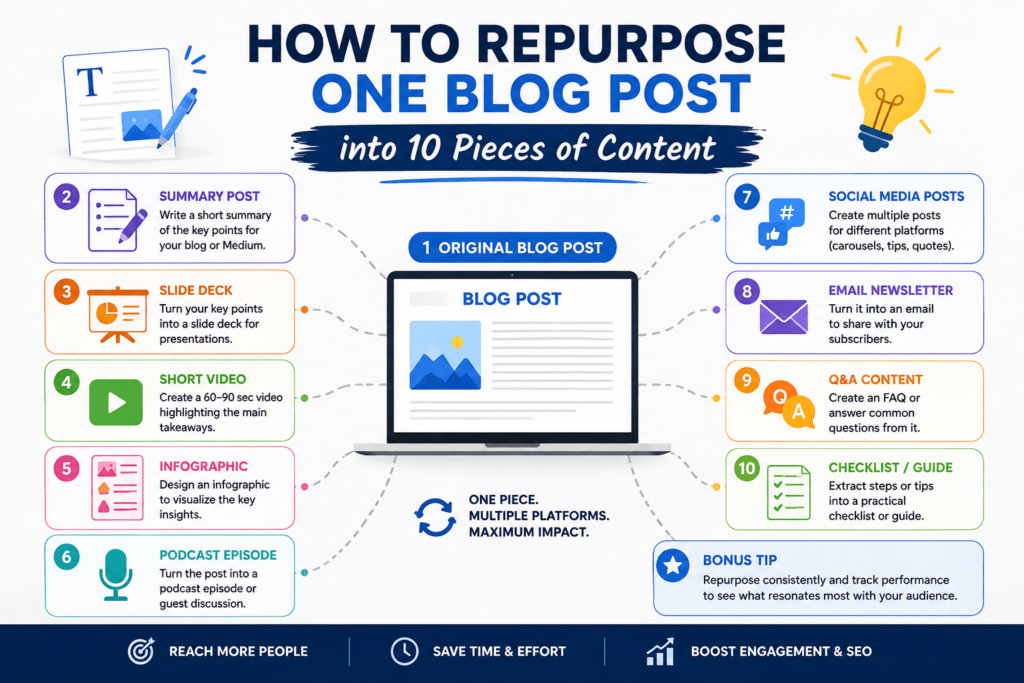
By learning how to take a single cornerstone piece of long-form writing and systematically slice, dice, and transform it into 10 distinct pieces of content, you can multiply your reach, build multi-channel authority, and save dozens of hours every month.
Let’s dive into the ultimate blueprint for turning one blog post into an omnichannel content engine.
Step 1: Laying the Foundation—The Cornerstone Post
Before you can slice an apple into ten pieces, you need a whole, healthy apple. Content repurposing fails when creators try to spin assets out of thin, low-quality articles. To successfully multiply your output, your original blog post must meet specific criteria:
Substantive Depth: Aim for a comprehensive guide, case study, or data-backed analysis (ideally 1,500 to 2,500 words).
Clear Modular Structure: Use distinct H2 and H3 subheadings, bullet points, numbered lists, and distinct step-by-step frameworks.
Actionable Takeaways: Fluff cannot be repurposed. Your post must contain frameworks, quotes, statistics, or actionable advice.
Once you have this master asset published, you possess a goldmine of raw material. Here is how you extract every ounce of value from it.
The 1-to-10 Repurposing Blueprint
Piece 1: The LinkedIn Thought Leadership Post
Format: Text-only post with a strong hook and line breaks.
Where to share: LinkedIn.
How to create it: Take the core contrarian insight, main thesis, or a surprising statistic from your blog introduction. Condense it into a punchy narrative. Start with a scroll-stopping hook (e.g., “Everyone says you need to write more content. They’re wrong. Here’s what you actually need to do…”). Break your thoughts into short, 1-to-2-line paragraphs, and end with a call-to-action (CTA) pointing to the link in the comments.
Piece 2: The Multi-Image Carousel
Format: 5-to-10 slide PDF document.
Where to share: LinkedIn, Instagram, or Pinterest.
How to create it: Look at a numbered list or a step-by-step framework within your blog post (e.g., “5 Steps to X”). Design a clean, branded carousel using a tool like Canva.
Slide 1: Title/Hook.
Slides 2–7: One step or tip per slide with minimal text.
Slide Final: Summary and a prompt to read the full blog post.
Piece 3: The Short-Form Video Script (Reels, TikTok, Shorts)
Format: 30-to-60 second vertical video.
Where to share: TikTok, Instagram Reels, YouTube Shorts.
How to create it: Isolate one specific problem and solution highlighted in your blog. Write a tight, conversational script using this structure:
The Hook (0–3s): Call out the viewer’s pain point.
The Body (3–45s): Deliver one rapid-fire, high-value tip drawn directly from a section of your post.
The CTA (45–60s): Tell them where to find the full deep dive.
Piece 4: The Newsletter Deep-Dive Edition
Format: Curated email newsletter.
Where to share: Email subscriber list (Substack, ConvertKit, Mailchimp).
How to create it: Don’t just paste the blog link into an email; subscribers rarely click cold links without context. Instead, write a personal introduction teasing the core problem, share one standout section or secret from the post inside the email body, and then say, “Want the rest of the framework? Read the full breakdown here.”
Piece 5: The X (Twitter) Thread
Format: 5-to-8 connected tweets.
Where to share: X (formerly Twitter).
How to create it: Take the main headings of your blog post and turn them into a structured thread.
Tweet 1: The main hook + “A thread 🧵” + summary of what they will learn.
Tweets 2–6: One key point or subhead per tweet, backed by data or a brief explanation.
Final Tweet: Summary + link back to the original blog post.
Piece 6: The Infographic / Visual Summary
Format: High-resolution graphic image.
Where to share: Pinterest, blog embeds, or X.
How to create it: Identify a process, a flowchart, or a set of statistics within your blog post. Translate this data into a visual hierarchy. Infographics perform exceptionally well on Pinterest and are frequently shared and linked back to by other sites, boosting your SEO backlink profile.
Piece 7: The Quora & Reddit Value-Bomb Answer
Format: Long-form conversational reply.
Where to share: Quora, Reddit (relevant subreddits).
How to create it: Search Quora or Reddit for questions related to your blog post’s core topic. Instead of dropping a spammy link, write a comprehensive, helpful answer directly addressing the user’s question using the insights from your blog. Naturally weave in a link at the end: “If you want to read a deeper breakdown of this exact framework, I wrote a complete guide here [Link].”
Piece 8: The Podcast / Audio Segment Script
Format: Solo audio track or talking points.
Where to share: Spotify, Apple Podcasts, or YouTube audio.
How to create it: Treat your blog’s introduction and subheadings as an outline for a 5-to-10-minute mini-episode. Speak conversationally, expanding naturally on the written bullet points. This allows you to capture the auditory learner segment of your audience with minimal extra preparation.
Piece 9: The Community Discussion Prompt
Format: Open-ended conversational question.
Where to share: Facebook Groups, Slack communities, Discord servers, or Circle spaces.
How to create it: Extract a controversial or highly debatable point from your blog post. Frame it as a question to community peers (e.g., “Quick question for the group: Do you agree with X, or have you found Y works better? I was just writing about this and…”). This drives engagement and gently positions you as a subject matter expert.
Piece 10: The Lead Magnet Checklist or Template
Format: Downloadable PDF resource.
Where to share: Website opt-in forms, landing pages.
How to create it: Turn the actionable steps or summary of your blog post into a clean, downloadable checklist, cheat sheet, or swipe file. Offer this free resource inside the blog post itself in exchange for email addresses, building your subscriber list while providing immediate utility.
Streamlining Your Workflow: How to Scale the Process
Repurposing content shouldn’t feel like building a rocket ship from scratch every time. To make this sustainable, bake repurposing into your standard content workflow:
Build a Repurposing Matrix: Keep a spreadsheet template tracking your core blog topics alongside columns for all 10 formats. Check them off as they go live.
Batch Your Production: Don’t write a LinkedIn post the day the blog drops and a TikTok script three weeks later. Dedicate one afternoon a month to taking your 4 latest blog posts and churning out all associated social assets in one go.
Leverage AI as an Assistant: Use AI tools to help draft initial social media hooks, summarize paragraphs for carousels, or outline X threads based on your blog text. Always edit the output to maintain your authentic voice and brand tone.
Conclusion: Work Smarter, Not Harder
Content marketing is a marathon, but you don’t have to run it with weights strapped to your ankles. By shifting your mindset from “creation” to “multiplication,” you ensure that every hour spent writing a comprehensive blog post yields maximum dividends across the entire digital ecosystem.
Stop letting your best ideas sit stranded on a single page. Pick your top-performing blog post today, choose three formats from the blueprint above, and start multiplying your impact.
Pro-Tip Note for Images: When publishing or updating your visual assets across these channels, always ensure you maintain clear alt text and descriptive file names (e.g.,
how-to-repurpose-blog-content-infographic.png) to maximize both accessibility and search engine visibility.